From 2.2 Mbits/sec to 27.5 Mbits/sec—a 12.5x improvement. That’s the difference Tailscale Peer Relays made when I traveled to India for the 2025 holidays.
Like any engineer visiting family abroad, I expected to stay connected to my homelab infrastructure back in North America—accessing Kubernetes clusters, using exit nodes, managing services. What I didn’t expect was just how painful that experience would become when international networks had me relying on Tailscale’s default relay infrastructure.
The Problem: DERP Across Oceans
Tailscale typically establishes direct peer-to-peer connections between devices using NAT traversal. When direct connections fail (due to restrictive firewalls, CGNAT, or other network conditions), traffic falls back to DERP (Designated Encrypted Relay for Packets) servers—Tailscale’s managed relay infrastructure that also assists with NAT traversal and connection establishment.
DERP servers work reliably, but they’re shared infrastructure—serving all Tailscale users who need relay assistance. They’re optimized for availability and broad coverage, not raw throughput for individual connections. When you’re in Delhi, India and trying to connect to infrastructure in Robbinsdale, MN, your traffic routes through a DERP server—sharing capacity with other users and subject to throughput limits that ensure fair access for everyone.
The real problem became apparent when I ran iperf3 tests. Sending all my traffic through DERP, across an ocean, resulted in severely throttled throughput averaging 2.2 Mbits/sec:
| |
iperf3 TCP throughput test from Delhi to Robbinsdale over DERP. The wildly variable sender bitrate reflects DERP QoS shaping on the connection. The receiver total (31.5 MB over 120 seconds) tells the real story: ~2.2 Mbits/sec sustained.
The connection was barely usable for anything beyond basic SSH—despite my ISP connection testing at 30-40 Mbits/sec to international destinations under normal conditions.
Why Direct Connections Failed
India’s residential networks are notoriously difficult for peer-to-peer connectivity. Carrier-grade NAT (CGNAT), strict firewalls, and asymmetric routing meant Tailscale couldn’t establish direct connections between my laptop in Delhi and my infrastructure in Robbinsdale, MN. Every connection attempt fell back to DERP relay.
Why NAT Traversal Fails in India
Indian ISPs have adopted CGNAT aggressively due to IPv4 scarcity—Jio, Airtel, BSNL, and ACT all place residential subscribers behind carrier-grade NAT. Worse, these deployments commonly use symmetric NAT (Endpoint-Dependent Mapping), which assigns different external ports for each destination and breaks standard UDP hole punching. Combined with double NAT from home routers, Tailscale’s NAT traversal simply can’t establish direct connections.
What Bad Looks Like
When I was troubleshooting my connection from Delhi, tailscale ping told the whole story:
| |
Three red flags here:
- Every ping routes through DERP — The
via DERP(ord)indicates all traffic is being relayed through Tailscale’s Chicago DERP server. Why Chicago? Tailscale selects the DERP server with the lowest combined latency to both endpoints. For Delhi-to-Minneapolis traffic, Chicago (ord) typically wins because it’s geographically close to my Robbinsdale infrastructure while still being reasonably reachable from India via trans-Pacific or trans-Atlantic routes. - High and variable latency — 441-478ms with noticeable jitter when it should be more consistent
- “direct connection not established” — Tailscale explicitly telling you NAT traversal failed
When Tailscale can establish a direct connection, you’ll see via <ip>:<port> instead of via DERP. The fact that it never upgraded to direct—even after multiple pings—confirmed that CGNAT was blocking hole punching entirely.
Diagnosing Your NAT Situation
If you’re experiencing similar connectivity issues, here’s how to diagnose whether CGNAT and symmetric NAT are affecting you.
Detect NAT Type with Stunner:
Stunner is a CLI tool that identifies your NAT configuration by querying multiple STUN servers. It was written by my colleague Lee Briggs and uses Tailscale’s DERP servers by default:
| |
Stunner will classify your NAT type and rate it as “Easy” or “Hard” for hole punching. If you see “Symmetric NAT” or “Hard”—that’s why direct connections are failing.
Tailscale’s Built-in Diagnostics:
Tailscale includes netcheck, which provides similar diagnostics plus Tailscale-specific information:
| |
This shows your NAT type, which DERP servers are reachable, and latency to each. Look for the MappingVariesByDestIP field—if true, you have symmetric NAT and hole punching will likely fail.
Check Connection Path with tailscale ping:
The simplest way to see how traffic is actually flowing is tailscale ping:
| |
This shows whether your connection is direct or relayed. If you see via DERP(xxx) in the output, traffic is being relayed. A direct connection shows via <ip>:<port> instead. Run it a few times—Tailscale continues attempting NAT traversal, so later pings might upgrade to direct even if the first one was relayed.
The Solution: Tailscale Peer Relays
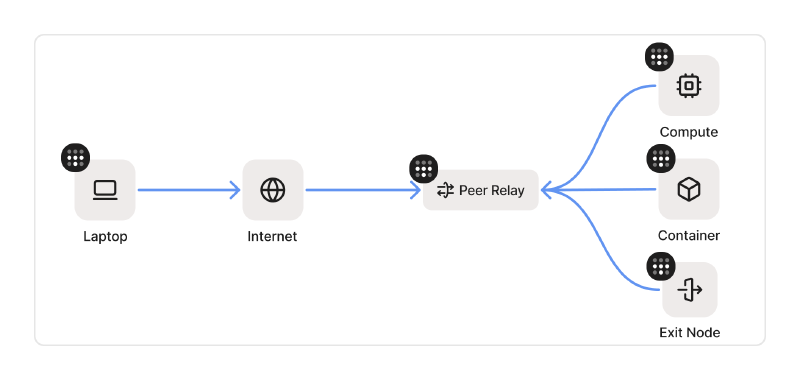
Tailscale Peer Relays, introduced in October 2025, offer an alternative: designate your own nodes as dedicated traffic relays within your tailnet. Unlike shared DERP infrastructure, peer relays give you full control over capacity—no competing for bandwidth, no QoS throttling.
How peer relays work
Peer relays function similarly to DERP servers but run on your own infrastructure:
- A node with good connectivity is configured as a peer relay
- When direct connections fail between other nodes, Tailscale routes through your peer relay instead of DERP
- Traffic remains end-to-end encrypted via WireGuard—the relay only sees encrypted packets
- Tailscale automatically handles connection upgrades in this preference order:
- Direct connection (NAT traversal succeeds) — lowest latency
- peer relay connection (when direct fails but relay is available) — dedicated capacity
- DERP relayed connection (always available fallback) — shared infrastructure
Under the hood, both clients establish independent UDP connections inbound to the relay node. The relay doesn’t initiate any outbound connections—it simply listens on its configured port and accepts incoming traffic from peers. When Client A sends a packet destined for Client B, the relay receives it on A’s connection, looks up B’s session, and forwards the packet out on B’s existing inbound connection. This bidirectional packet handoff happens entirely within the relay’s memory—packets arrive on one client’s socket and depart on another’s, with the relay acting as a simple forwarding layer for encrypted WireGuard traffic.
Tailscale continuously attempts to upgrade connections—even if you start on DERP, it will automatically switch to a peer relay or direct connection when one becomes available.
The critical advantage is dedicated relay capacity. DERP servers apply QoS shaping to ensure fair access across all Tailscale users—necessary for shared infrastructure, but a bottleneck for bandwidth-intensive use cases. Peer relays bypass this throttling entirely. For file transfers, media streaming, or in my case, managing remote infrastructure, that means removing the throughput ceiling that shared DERP infrastructure imposes.
Setting up peer relays
For my setup, I deployed a peer relay on one of my homelabs in Robbinsdale, MN—a residential fiber connection that serves as the hub for my distributed infrastructure. The setup takes about five minutes: run tailscale set --relay-server-port=<port> on the relay node, add a grant policy to your ACLs, and ensure the UDP port is accessible. See the Peer Relays documentation for the full setup guide.
The Results: 12.5x Improvement
After configuring peer relays, I ran the same iperf3 tests. The difference was dramatic:
| |
Same test, same location, peer relays enabled. Throughput stabilizes at 27-35 Mbits/sec—a 12.5x improvement over DERP.
Results comparison:
| Metric | Without peer relays (DERP) | With peer relays |
|---|---|---|
| Average Throughput | 2.2 Mbits/sec | 27.5 Mbits/sec |
| Total Transfer (120s) | 32 MB | 394 MB |
| Throughput Variability | High (QoS shaping) | Low |
| Connection Stability | Throttled | Consistent |
That’s a 12.5x improvement in throughput, plus dramatically more stable connections. The peer relay test showed consistent 30-50 Mbits/sec intervals with no sustained dropout periods.
Verifying peer relay connectivity
You can verify peer relay connections using tailscale ping. Here’s what the upgrade from DERP to peer relay looks like in real-time:
| |
The first ping routes through DERP (Chicago) at 452ms. By the second ping, Tailscale has established the peer relay path—latency drops to 298-306ms and stays consistent. The vni:619 is a Virtual Network Identifier that isolates this relay session.
Understanding the Baseline Latency
To put these numbers in context: the Delhi-to-Minneapolis route typically averages 280-320ms under good internet conditions. No direct submarine cable exists between India and the United States—traffic routes through Singapore, the Middle East, or Europe before crossing the Atlantic or Pacific.
The 298-306ms peer relay latency aligns with the expected baseline for this route. The latency improvement over DERP (452ms → 298ms) comes from skipping the extra hop through Chicago, but that’s a minor win. The real improvement is throughput—bypassing DERP’s QoS shaping means no artificial throttling on my connection. The ~150ms latency reduction is nice; the 12.5x throughput increase is transformative.
Security Model
Peer relays maintain Tailscale’s security guarantees:
- End-to-end encryption - All traffic remains WireGuard encrypted. The relay node only forwards opaque encrypted packets—it cannot inspect or modify the data.
- Session isolation - Each relay connection gets a unique Virtual Network Identifier (VNI), preventing cross-session interference.
- MAC validation - Relay handshakes use BLAKE2s message authentication codes with rotating secrets to prevent spoofing and replay attacks.
- Access control - Peer relays respect your tailnet’s ACL policies. A device can only use a relay if it has permission to reach that relay node.
The relay is essentially a dumb pipe for encrypted WireGuard packets—the same security model as DERP, just running on infrastructure you control.
Conclusion
Peer relays transformed my holiday connectivity from barely usable to genuinely productive. Instead of frozen terminals and failed file transfers, I could manage my homelab almost as efficiently as if I were back home.
If you’ve hit DERP’s throughput limits, peer relays are worth exploring. The setup is minimal—designate a node, open a UDP port—and you get dedicated relay capacity without the QoS shaping that throttles DERP connections. DERP remains the reliable fallback for availability and broad coverage, but when you need sustained throughput for bandwidth-intensive workloads, peer relays fill that gap.